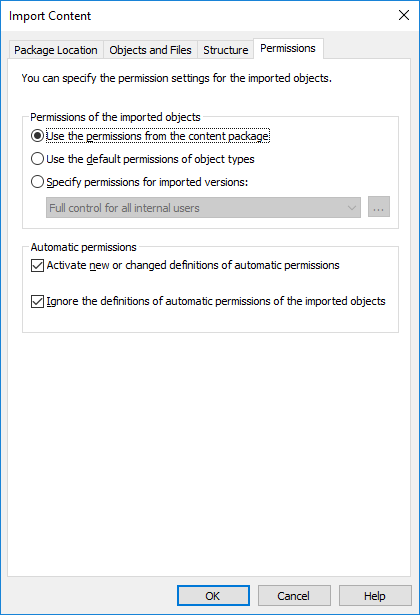
The Permissions tab of the importing dialog allows you to change the permission settings of the content to be imported.
Complete the following steps to modify the permissions:
Steps
- Open M-Files Admin.
- In the left-side tree view, expand the desired connection to M-Files Server.
- In the left-side tree view, expand the document vault of your choice.
-
Still in the left-side tree view, select the Content Replication and Archiving
node.
The content replication and archiving features are displayed in the right-side pane.
-
Either:
- Click One-time Import... if you want to modify
the permissions of a single import package.or
- Click the task area item New Scheduled Import... if you want to modify the permissions of a recurring import job.
Depending on your choice, either the Import Content or the Scheduled Job Properties dialog is opened. - Click One-time Import... if you want to modify
the permissions of a single import package.
-
Select the Permissions tab.
The Permissions tab of either the Import Content or the Scheduled Job Properties dialog is opened.
-
In the Permissions of the imported objects section, select
one of the following options:
Option Description Use the permissions from the content package Select this option if you want the imported objects to have the same permissions as the objects in the source vault. Use the default permissions of the object types Select this option if you want the imported objects to use the default permissions defined via the properties dialog of each object type. Specify permissions for imported versions Select this option if you want to manually define permission settings that are to be applied to all the imported objects. - Optional:
Check or uncheck the Activate new or changed definitions of automatic
permissions option checkbox.
If the content package contains any new or changed definitions of automatic permissions, importing the content package with this option enabled activates all the automatic permissions triggered by the imported definitions in the target vault. Importing the content package with this option unchecked still imports the automatic permission definitions to the target vault, but does not cause any new automatic permissions to be activated.
- Optional:
Check or uncheck the Ignore the definitions of
automatic permissions of the imported objects option
checkbox.
When selected, this option makes the importing process bypass the definitions of automatic permissions of all the imported objects in the content package. This way you can choose to preserve the automatic permissions of all the objects in the target vault by leaving out any potential changes to the definitions of automatic permissions from the objects in the imported content package.
- Click OK to close the dialog.