

Automatic permissions for value list items
You can use automatic permission settings to pass permissions for an object when the object has a property value, object type or class that uses automatic permissions. The object receives automatic permissions when a value with automatic permissions specified is added to the object metadata.
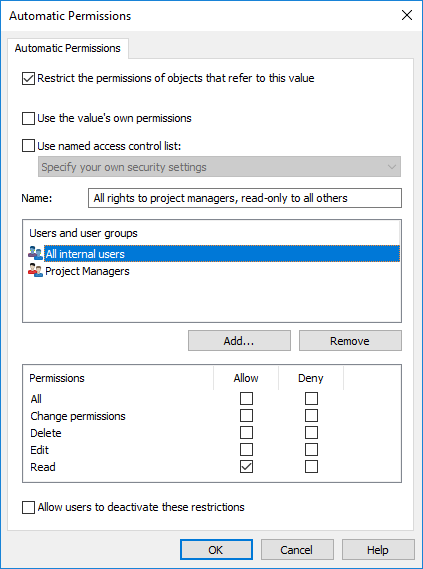
The "Automatic Permissions" dialog for a value list item.
In the above example, automatic permissions have been activated. Read-only access has been granted to all users and a separate access to project managers.
Restrict the permissions of objects that refer to this value
Activate the function Restrict the permissions of objects that refer to this value when you want to activate the automatic permissions.
Use the value's own permissions
You can use the permissions of a value or object, such as a project, as automatic permissions.
In this type of case, for example, a project plan inherits the permissions of the project that is added as a value to the metadata of the project plan. For example, the user has defined permissions for the project House project Haven that allow access for the project manager and project group only. When this project is added to the metadata of a project plan, the same permissions are granted to the plan.
Name
Give as descriptive a name as possible to the automatic permissions set, because this information will be displayed in the client software.
Specify permissions
You can then specify the automatic permissions that are always activated automatically for the object when a value, object, or class using automatic permissions is added to the object's metadata.
For more information on permissions, see Object permissions. Also refer to the specification of pseudo-users in Pseudo-users.
Allow users to deactivate these restrictions
You can also specify whether the users are allowed to deactivate the automatic permission restrictions created through this value, so that the users can delete the preset automatic permissions if necessary.
Remarks about using automatic permissions
The specified value providing automatic permissions must be selected on the metadata card for the explicit property definition for which you have enabled automatic permissions. See Verifying Which Properties Have Automatic Permissions Enabled.